
This article is to offer ‘at a glance’ diagnostic information and does not replace the opinion or inspection of a electrical technician where required.
Fronius Gen24 – basic overview. Status indicators are the left side of the LED bar and Wi-Fi status is the right side of the bar.
| Green | Solid – Normal operation |
| Flashing – Performing the grid checks required for feed-in mode. | |
| Yellow | Solid – Inverter is in standby and not operational (e.g when there is no feed-in during the night) or is not configured. |
| Flashing – non critical warning status | |
| Red | Solid – critical warning status – no grid power feed process. Restart the inverter – if the red indicator stays on contact Expert Energy. |
| Flashing – Backup power overload | |
| Blue | Flashing – Inverter is performing an update (whole bar will lights up) |
| White | Solid – There is a service message (whole bar will light up) |
SMA inverter – basic overview
| Green | 2 seconds on, 2 seconds off – awaiting feed-in conditions |
| Quick flashing – updating CPU, inverter being updated | |
| Glowing – Inverter feed-in with power at least 90% | |
| Pulsing – Feed-in in progress | |
| Off – not feeding |
| Red | Glowing, Event – you will see a event message and event number |
| Blue | Slow flash for around 1min – communication is being set up between the inverter and Wi-Fi |
| Glowing – Active connection with Wi-Fi |
Pylontech H3X Battery LED Indicators – basic overview
Press the start button for 2 seconds to then see the LED display will come on for 60 seconds.
The LED will come on automatically when the system changes modes or has an issue.
‘–‘ on the display in white indicates a self test is underway – the system has no output when in this mode.
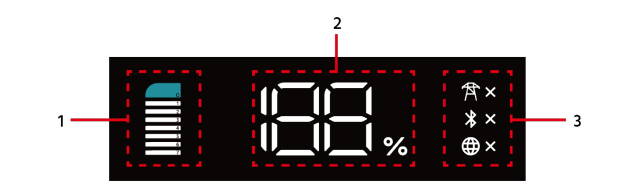

| 1 – ‘C’ Overall system health | The top of the charge icon (‘C’) will light up solid orange in the case of a failure. |
| The ‘C’ will flash orange indicating protection has occurred. | |
| The ‘C’ will flash blue when updating (1s on 1s off) or when in maintenance mode (0.5s on 0.5s off). | |
| The ‘C’ is blue and solid in normal operation |
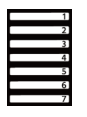
| 1 – battery module lights | Solid white – charging, displaying the number of connected modules |
| Flashing white: 1s on, 1s off – only number 7 blinking indicates sleep mode 1s on 1s off – discharging, displaying the number of connected modules 0.5s on 0.5s off – standby, displaying the number of connected modules | |
| Solid orange – fault, when this is related to one module that module will change to solid orange. | |
| Flashing orange – 1s on 1s off Energy storage controller protection, if just displaying on one module, this one module has the protection. |

| 2 – State Of Charge (SOC) | Solid white – range from 1-100% indicates charge |
| White codes: P1 Self consumption mode P2 Backup mode P3 Feed in priority mode P4 Full off-grid mode P5 Charge/Discharge time control |

| 3 – Power (Tower), Bluetooth (Rune), Wi-Fi (Globe) | |
| Power / Tower | Solid white no ‘X’ – AC connected and working in fee-in mode. Solid white with ‘X’ – AC disconnected Flashing white, with ‘X’, 1s on 1s off – AC connected and working in full off-grid mode |
| Bluetooth / Rune | Solid white no ‘X’ – normal Bluetooth connection Solid white with ‘X’ – not paired, waiting for connection |
| Wi-Fi / Globe | Solid white globe no ‘X’ – connected to internet Flashing white ‘X’, 1s on 1s off – loss of internet connection Solid white ‘X‘ – no internet has been connected |
Pylontech H3 Battery LED Indicators – basic overview
| Orange | Slow flashing – self check failure, contact Expert Electrical |
| Fast flashing – Temperature or other issue (restarting too soon after shutting down). Contact Expert Electrical for advice. | |
| Blue | Blue LEDs with no output – contact Expert Electrical |
Tesla Powerwall 3 – basic overview
The Powerwall uses a logo indicator, please note that expansion units do have a LED Logo and therefore no illumination.
| Solid white | Normal operation |
| Flashing white | Powerwall is idle. Will enter sleep state if no actions are in progress |
| Off | Powerwall is off or in sleep state |
| Flashing Red | Inverter (PWS) fault, e.g. AFCI or GFCI, RSD, etc. |
GoodWe battery – basic overview
| Green | Steady – Running normally, charging and operational |
| Blinking (once per second) – in standby mode (ready) | |
| Blinking (3 times per second) – communication lost | |
| Red | Blinking (every 1 second) – system alarm, the battery will perform a self-check. Wait for the battery to complete the check it will return to normal operation or enter system fault state |
| Steady – system fault, use the state of charge (SOC – battery icon) indicator to determine the fault (send a photo of the indicator to Expert Energy). |
Sungrow inverter LEDs – basic overview
| Blue | Solid – inverter operating normally |
| Flashing – standby or start up mode (not feeding into grid) | |
| Red | System fault |
| Off (grey) | Both the AC and DC sides are powered down |